React Fiber might be a new terminology for devs who have just recently entered this fascinating world of React.
Lets try to make it simple -
A Fiber is just a plain JavaScript object with certain properties.
A Fiber reconciler is the one which is currently being used by React (after version 16).
It fixes many long standing issues React had with its previous reconciler (Stack reconciler).
It is full rewrite of the React Core which enables many many capabilities of the React you know.
Stack Reconciler
In order to understand Fiber reconciler, we need to talk about the drawbacks of its predecessor - the Stack reconciler.
As the name suggests, it was a Stack which meant that - It was purely synchronous.
- If a work was pushed onto the stack, it couldn’t be interrupted until it was empty again.
- It couldn’t be preempted or paused in case of any incoming priority task.
- It lead to lags and delays in the rendering of the elements on the page.
Lets consider an example -
If the user has implemented an input box in such a way that as soon as something is entered in there, an API call is made to find certain relevant terms (which is a common use case namely autocomplete).
In this case, user will experience lag after every input as first API call has to be resolved for previous request and cannot be interrupted, which is a very bad UX.
Fiber
A Fiber is a unit of work in React.
These fibers enable React to be asynchronous.
React first processes all the fibers and then considers it as a finished work.
These changes are then later committed to make visible changes in the DOM.
Structure of a Fiber
A Fiber is always mapped one-to-one with something. It can be a component instance, a DOM Node, etc.
This something is depicted in the tag property of the Fiber which contains a number ranging from 0 to 25 to depict each and every different type of element the work is associated with.
You can have a look at what all those numbers represent -
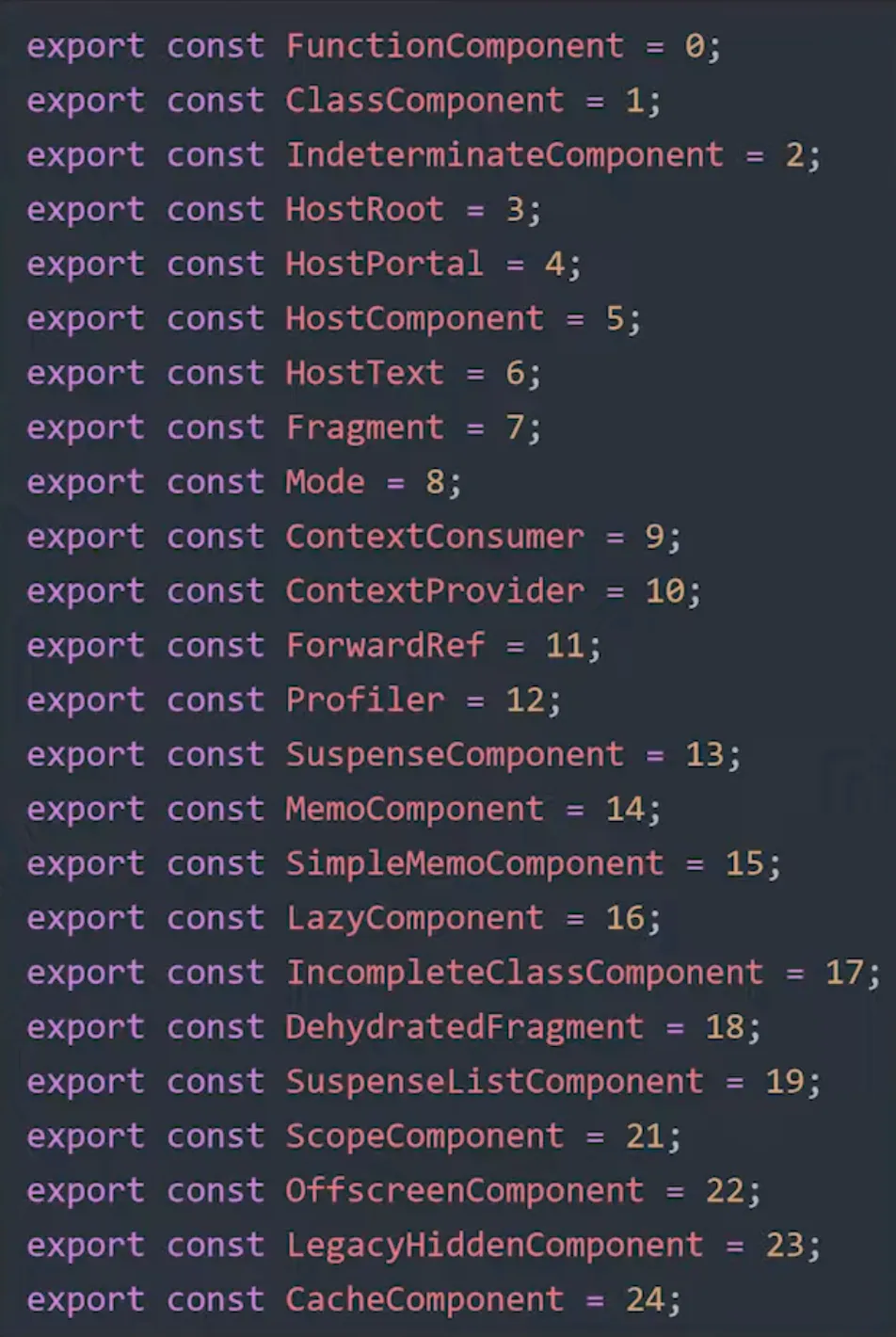
The stateNode property of the Fiber node holds the reference to the thing itself so that its state can be accessed anytime.
It also holds properties like - type and key which makes them look similar to React element to certain extent.
Infact, some fibers are created from React elements themselves via the function createFiberFromElement.
There are more functions like these -
- createFiberFromFragment
- createFiberFromText
You get the point.
Fiber Relationships
Just like how we get the Render Tree in React, we also get a Fiber Tree which shows the relationship between different Fiber nodes.
To show the relationship between nodes, a Fiber has 3 properties -
- child
- sibling
- return
Its just like a React Render Tree, although the differences are -
- There is only one child of a node which is nothing but its first child, if there are no children, it is null.
- The rest of the children of the node are connected to each other via the sibling property.
- And return property of the node points to the parent of itself and its siblings.
Work
A Work corresponds to -
- Any update which is causing any change to any DOM element.
- React lifecycle method invocation.
- Any changes to state.
React Fiber reconciler processes any work into 2 phases -
Render phase (processing)
In this phase, we have functions like beginWork() and completeWork() to denote the beginning and the end of the work.
But here,
- A work can be paused, and resumed whenever needed.
- Any work can be reused if needed, or it can be scheduled for the future.
- Time Slicing is implemented which enables a work to be split into chunks of work.
- Priority work like animations can be given high priority and can interrupt other ongoing work.
- Any low priority work can be deferred here.
As you can see, this phase of the reconciler is asynchronous.
Lets see how React Fiber Tree is navigated -
- The fiber tree is processed top to bottom, and beginWork() is called on the nodes.
- If the fiber node has a child, it will call its beginWork() and so on.
- Once a node is reached with no child, its corresponding work is done and completeWork() is called for that fiber.
- Then the node’s siblings are accessed.
- After all siblings’ work is done, their parent’s completeWork() is called, and so on.
While doing so, a list of effects is maintained, and passed on to commit phase.
The lifecycle methods - render() and shouldComponentUpdate() are executed in the render phase.
Special Note
In case any work that you deem urgent can be prioritized via requestAnimationFrame() which will execute your code in the next animation frame.
In case any work needs to be delayed, it can be deferred via requestIdleCallback() which gets picked up as soon as rendering finishes.
Commit phase (committing the visual changes onto the DOM)
This is the synchronous part of reconciling wherein, all the changes are finally committed onto the DOM.
A lot of work is done here too! - Lifecycle methods and DOM Changes are addressed in Commit phase.
Since these changes can affect other components too, they are called side effects or just effects, whose list is passed down from the render phase.
That’s essentially what effects list tells us
- What nodes are to be inserted/deleted?
- What lifecycle methods are to be called for a component instance?
All these effects are executed synchronously in a single pass.
Methods like componentDidMount() and componentDidUpdate() are executed here.
current & workInProgress Trees
React’s architecture relies on a concept borrowed from game development called double buffering.
current tree contains what is exactly on the screen right now.
workInProgress tree holds what will be shown next on the screen.
Render Phase
In the render phase,
- All nodes are traversed in the current tree and copies of it are made in the workInProgress tree after updations caused due to state or props change.
- Any effects (DOM updations/lifecycle methods) are tagged and added to the effects list.
- This way we have the workInProgress tree at the end of render phase.
Commit Phase
- All DOM mutations from the effects list are executed synchronously uninterrupted.
- After DOM is updated, a pointer swap is made - workInProgress tree becomes current tree, and current tree becomes workInProgress tree.
- After the swap, React fires of the list of lifecycle methods and hooks.